
.webp)
.png)
Core architecture choices for how to make a chatbot with Python
Building a chatbot with Python requires choosing between a deterministic logic flow or a probabilistic language model. Your decision dictates the complexity of your codebase, the cost of operation, and the reliability of the bot's responses.
Most production-grade systems now utilize a hybrid approach, using rule-based logic for sensitive tasks like authentication and generative models for natural language understanding.
Rule-based versus generative model trade-offs
Rule-based chatbots operate on predefined scripts, typically using libraries like re for pattern matching or frameworks like Rasa for intent classification. These systems are predictable, free to run, and ideal for constrained environments where accuracy is non-negotiable.
If your chatbot needs to handle password resets or specific database queries, a state machine is superior to an LLM because it prevents hallucinations and ensures consistent data output.
Generative models, such as those accessed via the openai or langchain Python libraries, leverage Large Language Models to interpret user intent and construct human-like responses. These are essential when the conversation flow is unpredictable or requires nuanced sentiment analysis. However, they introduce latency and cost per token.
A common implementation pattern involves using a small, local model like spaCy to extract entities, then passing that structured data to an LLM to generate the final response. This reduces the token count and keeps the model focused on the specific task at hand.
When deciding between these two, evaluate your tolerance for error. If a wrong answer could result in a security vulnerability or a legal compliance issue, stick to a rigid state machine. If the goal is customer engagement or general information retrieval, a generative model provides a significantly better user experience.
For most developers, the optimal path is to implement a fallback mechanism: use a rule-based system for core functionality and trigger the generative model only when the user's input falls outside the scope of your predefined intents.
Essential libraries for chatbot development
Building a functional chatbot requires a stack that balances ease of integration with granular control over data flow. For Python developers, the ecosystem is dominated by libraries that handle natural language processing (NLP), state management, and API connectivity.
At a minimum, you will need an HTTP framework to serve your bot, a vector database if you are implementing Retrieval-Augmented Generation (RAG), and an orchestration layer to manage conversation history.
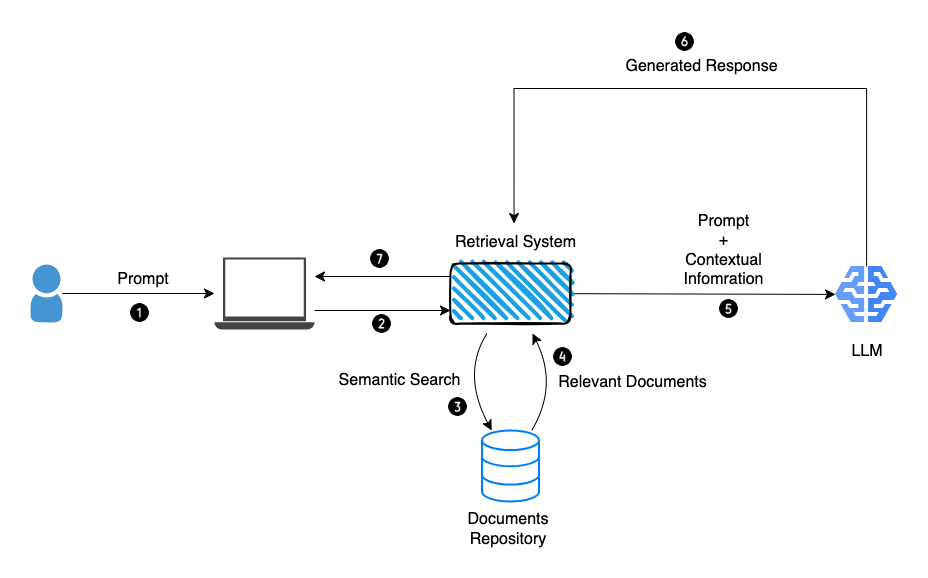
Key libraries often include FastAPI for high-performance asynchronous endpoints, Pydantic for robust data validation, and ChromaDB or FAISS for managing document embeddings. If you are connecting to LLM providers, the openai or anthropic SDKs are standard, though they should be wrapped in an orchestration layer to prevent tightly coupling your business logic to a specific model provider.
Framework selection criteria
Choosing the right architecture depends on whether you are building a simple intent-based bot or a complex, context-aware agent. The decision often hinges on the trade-off between development speed and long-term maintainability.
- LangChain: This is the industry standard for rapid prototyping. It provides pre-built "chains" that handle prompt templating, memory management, and tool-calling. It is ideal if you need to connect your bot to external APIs or document stores quickly. However, the abstraction layer can become opaque, making debugging complex logic difficult as the project scales.
- Rasa: Unlike general-purpose LLM frameworks, Rasa is designed for enterprise-grade conversational AI. It excels in scenarios requiring strict control over dialogue flow and intent classification. If your chatbot must follow rigid compliance rules or operate in a low-latency, offline environment, Rasa’s NLU and dialogue management capabilities are superior to generic LLM wrappers.
- Native FastAPI implementation: For developers who prioritize performance and minimal dependencies, building a custom wrapper around an LLM API using FastAPI is often the most efficient route. This approach avoids the "black box" nature of heavy frameworks, allowing you to implement custom middleware for logging, rate limiting, and authentication exactly as your infrastructure requires. This is the preferred method for production systems where every millisecond of latency and every token of overhead matters.
When deciding, evaluate your team's familiarity with asynchronous programming. Frameworks like LangChain simplify complex tasks but require a deep understanding of their internal state management to avoid memory leaks in long-running sessions.
Data handling and state management
Building a functional chatbot requires more than just processing natural language; you must track the context of a conversation. Without state management, your bot treats every user message as an isolated event, losing track of previous inputs.
In Python, you can manage this by storing session data in a dictionary, but this approach fails the moment your server restarts or scales horizontally.
Persistent storage strategies
To maintain session state across multiple requests, you need a persistent storage layer. Relying on local memory is a common pitfall that prevents your chatbot from scaling. Instead, integrate a dedicated database to handle user history and session variables.
For high-frequency applications, Redis is the industry standard. Because it stores data in RAM, it provides the sub-millisecond latency required for fluid conversational experiences. You can store user session objects as JSON-serialized strings, using the user's unique ID as the key.

Here is a basic implementation pattern using the redis-py library:
import redis
import json # Connect to local Redis instance
client = redis.Redis(host='localhost', port=6379, db=0) def save_session(user_id, data): client.set(f"session:{user_id}", json.dumps(data)) def get_session(user_id): data = client.get(f"session:{user_id}") return json.loads(data) if data else {}
If your chatbot requires long-term data retention or complex querying of past interactions, a relational database like PostgreSQL is a more robust choice. Using an ORM like SQLAlchemy allows you to map conversation logs to structured tables. This is particularly useful when you need to audit bot performance or train future models on historical user queries.
When deciding between these two, consider your latency requirements. Redis is ideal for ephemeral state—like tracking which step of a multi-turn form a user is currently on. PostgreSQL is better suited for storing the actual transcript of the conversation for analytics or compliance. Many production systems use a hybrid approach: Redis for active session state and PostgreSQL for permanent message logging.
Deployment constraints and latency issues
Building a functional chatbot is only half the battle; deploying it to a production environment introduces significant performance bottlenecks. Python’s Global Interpreter Lock (GIL) often limits CPU-bound tasks, which can cause your chatbot to hang when processing complex natural language queries or managing multiple simultaneous connections.
You must account for memory overhead, especially when loading large transformer models like Llama 3 or BERT directly into RAM, as these can easily exceed the limits of standard low-cost cloud instances.
Asynchronous processing with FastAPI for concurrent user interactions
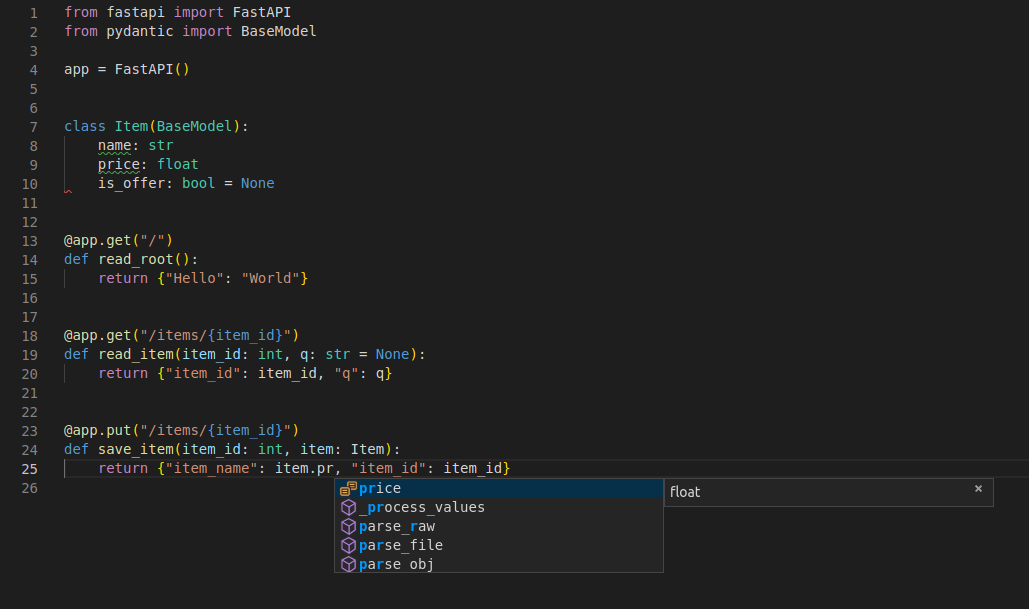
To ensure your chatbot remains responsive under load, move away from synchronous frameworks like Flask and adopt FastAPI. By utilizing the async and await keywords, your application can handle I/O-bound tasks—such as waiting for an external LLM API response or querying a vector database—without blocking the main event loop.
This architecture allows the server to process incoming messages from other users while waiting for a previous request to resolve. When implementing this, structure your endpoints to offload heavy computational tasks to background workers.
Use a task queue like Celery combined with Redis to manage these processes. This prevents the HTTP request-response cycle from timing out if a model takes several seconds to generate a response. For example, your FastAPI route should trigger a background task and return a 202 Accepted status, while a separate worker handles the inference logic.
Monitor your deployment using tools like Prometheus and Grafana to track request latency and memory usage. If you notice spikes during peak traffic, consider containerizing your application with Docker and orchestrating it via Kubernetes. This allows for horizontal scaling, where you can spin up additional instances of your chatbot service automatically as the number of concurrent users increases.
Always profile your code using cProfile or py-spy to identify specific functions that are causing latency before attempting to scale your infrastructure.
Security considerations for python implementations
When you learn how to make a chatbot with python, your primary vulnerability lies in how you handle API keys and user data. A common mistake is hardcoding credentials directly into your source code, which risks accidental exposure if you push your repository to public platforms like GitHub.
Even in private repositories, hardcoding limits your ability to rotate keys or manage different environments effectively.
Environment variable management
The industry standard for handling sensitive credentials is to use environment variables. Instead of placing your OpenAI, Anthropic, or database credentials in your script, store them in a local .env file. You can use the python-dotenv library to load these variables into your application at runtime.
To implement this, create a file named .env in your project root:
OPENAI_API_KEY=sk-your-actual-key-here
DATABASE_URL=postgresql://user:password@localhost:5432/db
Then, access these in your Python code using the os module:
import os
from dotenv import load_dotenv load_dotenv()
api_key = os.getenv("OPENAI_API_KEY")
Always add .env to your .gitignore file to ensure these secrets are never committed to version control. For production deployments, avoid using .env files entirely. Instead, inject secrets directly into your hosting environment (such as AWS Secrets Manager, Heroku Config Vars, or GitHub Actions Secrets).
This ensures that your production environment remains isolated from your local development configuration. Beyond credential management, sanitize all user inputs to prevent prompt injection attacks. If your chatbot executes code or queries a database based on user input, treat every string as untrusted.
Use parameterized queries for database interactions and implement rate limiting on your API endpoints to prevent malicious actors from exhausting your token budget or crashing your service through excessive requests.
Frequently Asked Questions
Python language suitability for chatbot development
Python is the industry standard for chatbots due to its extensive ecosystem of NLP libraries like NLTK, spaCy, and integration capabilities with LLM APIs like OpenAI or LangChain. However, its performance in high-concurrency environments may require asynchronous frameworks like FastAPI or Celery to handle multiple simultaneous requests effectively.
Primary challenges when deploying a Python-based chatbot
The primary challenges include managing state persistence, ensuring low-latency API calls, and handling token limits. Developers must also account for security, such as sanitizing user inputs to prevent prompt injection and managing API key rotation securely. Improving your strategic decision making regarding infrastructure choices is vital to overcoming these hurdles.

