
.webp)
.png)
Identifying the root cause of deposit delays
When a Crypto deposit fails to appear in your BingX wallet, the delay usually stems from either blockchain congestion, incorrect network selection, or an incomplete transaction broadcast. Before contacting support, check the transaction hash (TXID) on a block explorer like Etherscan or BscScan to verify the status. For those looking for a comprehensive breakdown of platform features, our BingX crypto exchange review offers a deep dive into how these systems handle user assets.
If the transaction shows as 'Success' but the funds are missing, the issue is likely a protocol mismatch or a pending confirmation threshold.
Network confirmation requirements
BingX mandates a specific number of block confirmations to ensure the transaction is immutable and secure. Each blockchain has a different block time; for instance, Bitcoin requires a higher number of confirmations compared to faster chains like Solana or Arbitrum.
If you send funds during high network traffic, the time taken to reach the required confirmation count increases significantly. You can view the specific confirmation status of your deposit by clicking on the 'Deposit History' tab within your BingX account dashboard. If the progress bar is still moving, the funds are held by the network, not the exchange, and will credit automatically once the threshold is met.
Mismatching asset and network protocols
A frequent error occurs when users select one network on BingX but initiate the transfer using a different protocol from their external wallet. For example, sending USDT via the ERC-20 (Ethereum) network when you selected BEP-20 (BNB Smart Chain) on BingX will result in the funds not appearing in your balance.
While both are USDT, they exist on different ledgers. If you have sent assets to an incompatible network, the funds are not lost, but they are not accessible to your account. You must submit a 'Deposit Recovery' request through the BingX help center, providing the TXID, the correct network, and the specific asset type. This process requires manual intervention by the technical team to bridge the assets back to your wallet, which can take several business days.
Standard procedure for How to deposit Crypto on BingX
To initiate a transfer, log in to your BingX account and navigate to the Assets menu, then select Deposit. Choose the specific Cryptocurrency you intend to transfer from the list. If you are exploring new projects, you might also want to look into top crypto presales to diversify your portfolio safely.
Once selected, pick the corresponding blockchain network—for example, ERC-20 for Ethereum or BEP-20 for BNB Smart Chain. Copy the generated deposit address or scan the QR code provided by the platform to complete the transaction from your external wallet or exchange.
Selecting the correct deposit address and memo
Certain Cryptocurrencies, most notably XRP, EOS, and XLM, require both a deposit address and a specific memo or destination tag to ensure the funds reach your account. The address acts as the general destination, while the memo serves as the unique identifier that links the transaction to your specific BingX user profile.
If you omit the memo or enter it incorrectly, the exchange system cannot automatically attribute the incoming funds to your wallet. In such cases, the transaction will be successfully processed on the blockchain but will remain stuck in the platform's omnibus wallet, requiring you to contact customer support with your transaction hash to manually recover the assets.
Verifying minimum deposit thresholds
Every digital asset on BingX has a defined minimum deposit limit. You can view these specific thresholds directly on the deposit selection page for each coin. Before moving large amounts, it is always wise to perform essential crypto due diligence to ensure the platform and the asset meet your security standards.
If you send an amount lower than this minimum, the platform's automated system will not credit the funds to your account balance. These small, sub-threshold deposits often remain unprocessed because the cost of aggregating them exceeds their value. Always verify the minimum requirement before initiating a transfer, as attempting to send a second, smaller deposit to reach the threshold usually does not trigger the credit of the initial failed transaction.
Tracking transaction status on the blockchain
When a deposit does not appear in your BingX account, the blockchain explorer is your primary source of truth. Because Crypto transactions are immutable, the network ledger confirms whether the funds actually left the sender's wallet and reached the destination address.
If the block explorer shows the transaction as "Success" or "Confirmed," the issue lies within the exchange's internal processing rather than the network itself.
Using Etherscan and BscScan for verification
To verify your transfer, you must first locate your Transaction Hash (TXID) from your withdrawal platform's history tab. Once you have this alphanumeric string, navigate to the appropriate block explorer based on the network you selected when you learned how to deposit Crypto on BingX. Use Etherscan for Ethereum (ERC-20) transfers or BscScan for BNB Smart Chain (BEP-20) transactions.
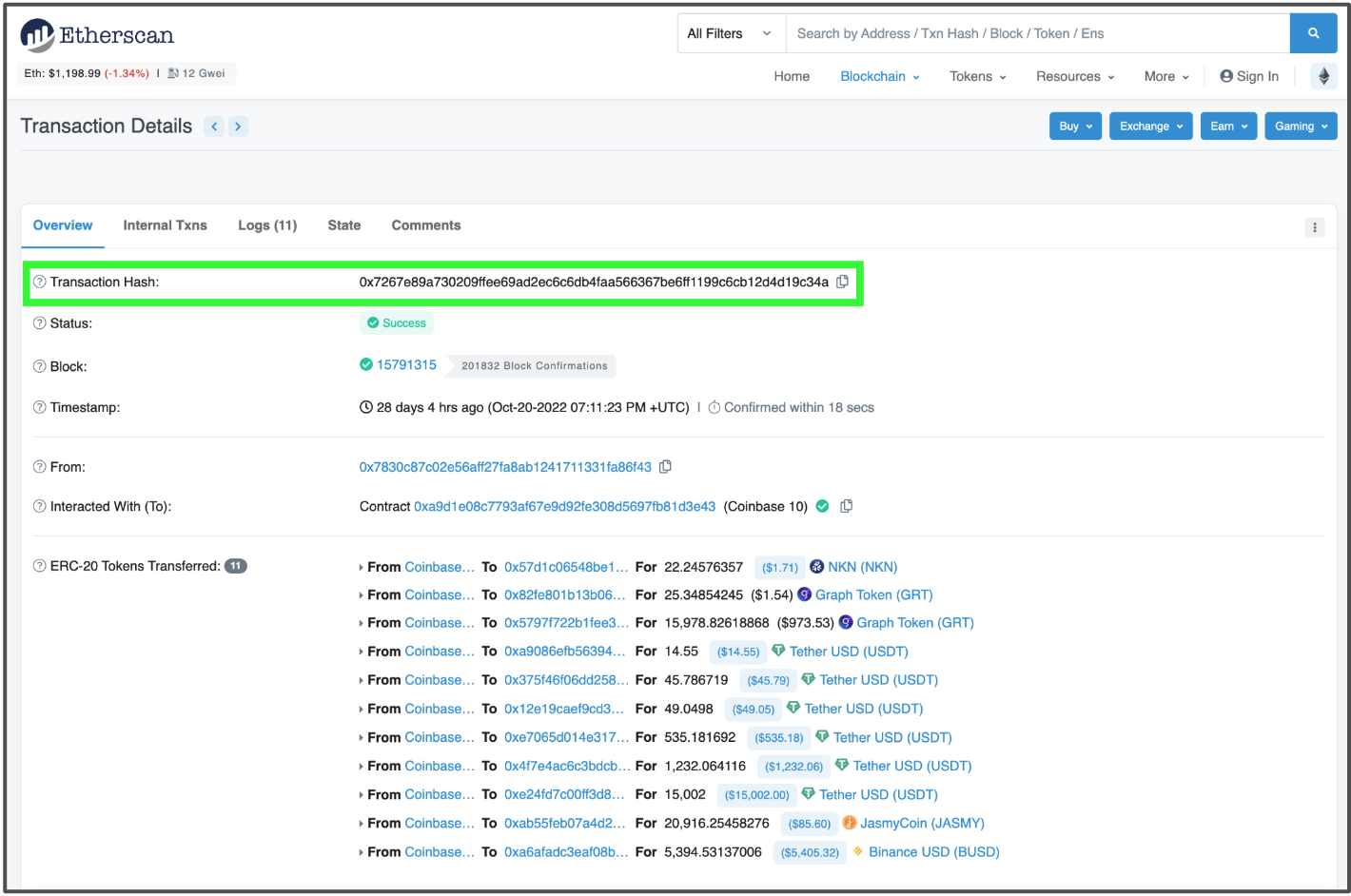
Follow these steps to perform a manual check:
- Paste the TXID: Enter the full transaction hash into the search bar at the top of the explorer homepage.
- Check Confirmation Count: Look for the "Status" field. If it says "Success," click on the "To" address to ensure it matches the exact deposit address provided by your BingX account.
- Verify Token Contract: If you deposited a stablecoin or altcoin, ensure the "Token" field matches the specific contract address supported by BingX. Sending a token to the wrong contract address is a common cause of missing deposits.
- Confirm Block Depth: Even if a transaction is successful, BingX requires a minimum number of block confirmations before crediting your account. If the explorer shows the transaction is still pending or has low confirmation counts, wait for the network to reach the threshold typically required by the exchange.
If the explorer shows the transaction was reverted or failed, the funds never left the sender's wallet. In this scenario, you must contact the support team of the platform you sent the funds from, as BingX cannot intervene in a transaction that failed to execute on-chain.
Escalation paths for missing funds
If your deposit remains uncredited after the standard blockchain confirmation window, you must initiate a formal support request. BingX support operates on a ticketing system where the speed of resolution is directly proportional to the clarity and accuracy of the information provided. For professional guidance on navigating complex legal or regulatory hurdles in the space, consulting with best crypto lawyers in 2024 can be a vital step for high-volume traders.
Avoid submitting multiple tickets for the same issue, as this can reset your position in the support queue and cause confusion for the processing agent.
Required evidence for support tickets
To expedite your recovery request, compile the following data points before opening a ticket. Providing this information upfront prevents the support team from having to ask follow-up questions, which can save 24 to 48 hours in processing time:
- Transaction Hash (TxID): This is the most critical piece of data. Ensure you copy the full alphanumeric string from your sending wallet's history.
- Asset and Network Details: Explicitly state the token name (e.g., USDT) and the specific blockchain network used (e.g., ERC-20, TRC-20, or BEP-20). Mismatched networks are the leading cause of deposit failures.
- Deposit Address: Provide the exact wallet address you copied from your BingX deposit page.
- Visual Proof: Attach a high-resolution screenshot of the transaction from your sending wallet. This must clearly show the sender's address, the recipient's address, the amount, the status as 'Completed' or 'Confirmed,' and the timestamp.
- BingX UID: Include your unique user ID, which can be found in your profile settings.
Once you have gathered these details, navigate to the 'Support' or 'Help Center' section on the BingX website or mobile app. Use the live chat feature to initiate the ticket, but be prepared to paste your evidence into the chat window if requested.
If the transaction is stuck due to a network congestion issue or a smart contract error, the support team will escalate the case to the technical department for manual reconciliation. Keep a record of your ticket number and follow up only if you have not received an update within 72 hours.
Frequently Asked Questions
Common reasons for delayed deposit visibility
The most common reasons include selecting the wrong blockchain network (e.g., sending BEP20 to an ERC20 address), failing to include a required Memo or Tag for assets like XRP or EOS, or the transaction not yet meeting the minimum required block confirmations. If you are interested in how these technical standards are marketed, check out our guide on web3 crypto marketing strategies.
Typical processing timeframes for Crypto deposits
Deposit times depend on the specific blockchain's network congestion and the number of confirmations required by BingX. Most stablecoin transfers via TRC20 or BEP20 complete within 5 to 30 minutes, while older chains like Bitcoin may take longer.

